

Some links on this page are affiliate links. If you buy through one, Planet 3DP earns a small commission at no extra cost to you. It never changes what we recommend. How this works.
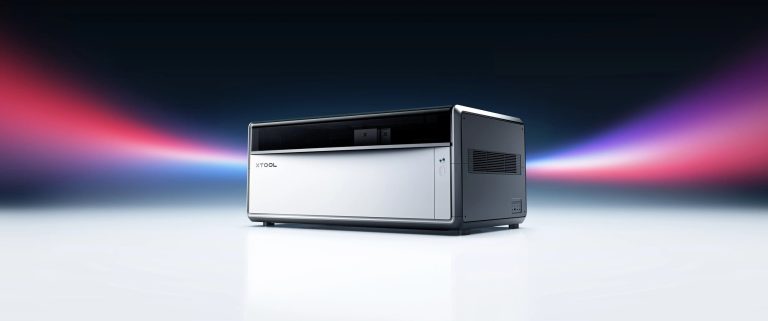
xTool X1 vs Bambu Lab R1 comes down to what you want the laser to become. The R1 is the cheaper, lighter 55W CO2 cutter at 2,499 dollars. The X1 starts at 3,399 dollars with the same 55W of CO2 power, then takes a fast diode galvo module and, after that, UV, fiber or MOPA sources for glass and metal. If CO2 cutting is all you need, the R1 costs less. If you want one machine to grow into metal and glass, the X1 is built for that.
Both makers now publish full specs and prices, and they don’t line up as neatly as the early previews suggested. The cut depths are measured on different woods and lenses, the top speeds come from different motion systems, and both machines become Class 4 lasers with their conveyor accessories. This page sets the two side by side from the xTool X1 and Bambu Lab R1 pages, read on November 12, 2026.
It’s based on specs, not tests. xTool works with Planet 3DP and plans to send Nick a laser for a future video. It isn’t an X1, and nobody here has used an X1 or an R1. The xTool links on this page are affiliate links, the same as the Bambu Lab ones. Every machine we track is in the laser engraver directory, and our best laser engravers guide covers the wider field.
- Verdict
- Buy the R1 for CO2 cutting and engraving at the lower price. Buy the X1 if you plan to add metal or glass work to the same machine later.
- Bambu Lab R1
- 2,499 dollars, in stock at Bambu’s US store. List price checked November 12, 2026.
- xTool X1
- 3,399 dollars for X1 Single CO2, shown against a 3,699 dollar compare price. Launch offers end December 6 at 11:59 PM PST. List price checked November 12, 2026.
- Same on both
- 55W CO2 laser, enclosed, Class 1 in normal use, cuts 20 mm acrylic.
- Biggest difference
- The X1 takes extra laser sources. The R1 is CO2 only and can’t engrave bare metal.
- Tested by Nick
- Neither. This page is based on the makers’ specs.
From xTool’s X1 page, Bambu Lab’s R1 spec page and Bambu Lab’s US store, all read November 12, 2026.
Want more on the X1 first? The X1 listing has the full spec sheet and our X1 explainer has every configuration xTool listed at launch.
xTool X1 vs Bambu Lab R1: the specs
| Spec | xTool X1 | Bambu Lab R1 |
|---|---|---|
| Laser | 55W CO2. Optional 20W diode, 5W UV, 60W MOPA, 30W fiber | 55W CO2 |
| Work area | 615 x 320 mm surface engraving | 600 x 300 mm, or 600 x 3000 mm with the Conveyor |
| Max speed | 600 mm/s on CO2. 6,000 mm/s on the galvo sources | 1,000 mm/s, 20,000 mm/s² acceleration |
| Max cut, wood | 18 mm basswood | 15 mm walnut plywood on the standard lens. 18 mm with the medium or long lens |
| Max cut, acrylic | 20 mm | 20 mm on every lens |
| CO2 spot size | 0.175 x 0.175 mm | 0.11 mm short lens, 0.17 mm medium, 0.19 mm long |
| Size | 1,000 x 580 x 420 mm | 940 x 560 x 200 mm as listed. Needs 650 mm of height with the lid open |
| Weight | 60 kg main unit | 33.5 kg |
| Software | xTool Studio | Bambu Suite |
| Computers and phones | Windows, macOS, Android, iOS, iPad | Windows, macOS |
| Connection | USB, WiFi | USB, dual band WiFi |
| Laser class | Class 1. Class 4 with the Intelligent Conveyor Feeder | Class 1. Class 4 with the Riser Base or auto feed |
What each one costs
Start with the base machines. The R1 is 2,499 dollars and the X1 Single CO2 is 3,399 dollars, so the X1 costs 900 dollars more before any extras. That’s xTool’s launch price. Its page shows 3,699 dollars as the compare price, and the launch offers end December 6 at 11:59 PM PST.
Bambu sells two bundles on its US store. Their contents differ from xTool’s bundles, so don’t compare them on price alone.
| Bambu Lab R1 version | What’s added | Bambu store price | Stock |
|---|---|---|---|
| R1 | The machine, clear acrylic and basswood plywood samples | 2,499 dollars | In stock |
| R1 Long Material Bundle | Riser Base and Automatic Conveyor Feeder | 3,289 dollars (3,387 struck through) | In stock |
| R1 Long Material and Rotary Bundle | Adds the Rotary Attachment and its bracket | 3,499 dollars (3,663 struck through) | Out of stock |
The X1 has more steps. Adding the 20W Diode Galvo Module gets you the fast engraving head, and xTool says that module is required before you can add UV, fiber or MOPA. xTool also sells bundles with accessories. We couldn’t read those prices today, so check xTool’s store, or see the launch prices in our X1 explainer, which are dated October 28.
Both makers sell extras on top. Bambu lists the medium and long focus lenses, the Riser Base, the Conveyor, the Rotary, the Vision Encoder, the E1 Pro air purifier and the Auto Fire Extinguishing System as sold separately.
Cut depth: read the small print
On paper the R1 cuts 18 mm of wood and the X1 cuts 18 mm too. They aren’t the same claim.
Bambu’s 18 mm figure is black walnut plywood, and it needs the medium or long focus lens, sold separately. On the short focus lens, the standard one, Bambu lists 15 mm. xTool’s 18 mm is basswood, a softer wood, from the X1’s CO2 head. Both makers list 20 mm of acrylic.
So a buyer who plans to cut thick hardwood on the R1 should budget for a second lens. Nobody has published a test cutting the same board on both machines, and we haven’t either.
Speed: two different claims
The R1 lists 1,000 mm/s on its CO2 laser. The X1 lists 600 mm/s on CO2 and 6,000 mm/s on its galvo sources. Those numbers can’t be ranked against each other.
The X1’s 6,000 mm/s comes from a galvo head, where mirrors steer the beam instead of the whole gantry moving. xTool calls its mix of gantry and galvo motion Hybrid Motion. You only get it with the 20W Diode Galvo Module or one of the other galvo sources. A Single CO2 X1 runs at up to 600 mm/s.
The R1 moves its CO2 head on a gantry, like most CO2 lasers, at up to 1,000 mm/s. Bambu says it keeps engraving depth even at that speed.
Line them up yourself. Our compare tool puts the X1, the R1 and every other laser we list side by side, with the specs and live store prices.
Open the compare toolMetal, glass and room to grow
This is the real split. Bambu says the R1 engraves coated metal, glass and ceramic but can’t engrave bare metal. It’s a CO2 machine and stays one.
The X1 is built to take more sources. xTool says its 5W UV source is the only X1 source that does glass inner engraving, and it points to the 60W MOPA and 30W fiber sources for metal colour engraving, embossing and cutting. All three need the Diode Galvo Module fitted first.
If you’ll never touch metal, that flexibility costs you money and 26.5 kg of extra weight. If you would otherwise buy a second machine for metal, it’s the reason the X1 exists.
Laser class and safety
Both are Class 1 lasers in their normal enclosed setup, so the beam stays inside the box. Both makers also say that changes with their long material accessories.
Bambu says that with the Riser Base or the auto feed accessory fitted, the enclosure is no longer complete and the R1 becomes a Class 4 device. That calls for CO2 laser safety eyewear and trained users only. xTool says the X1 runs as a Class 4 laser device with its Intelligent Conveyor Feeder. With the 5W UV source fitted, Class 3B radiation is reachable during optical alignment. xTool says both setups are for trained professionals only.
Note on the long stock bundles. The R1 Long Material Bundle includes the Riser Base and the conveyor, so that bundle is the Class 4 setup in Bambu’s own words. Plan the room, the eyewear and the ventilation before you order it.
Software and size
The R1 runs Bambu Suite on Windows and macOS. The X1 runs xTool Studio, which xTool lists for Windows, macOS, Android, iOS and iPad. If you’d like to send jobs from a tablet, that’s worth knowing.
Size matters more than it looks. The X1 weighs 60 kg and measures 1,000 x 580 x 420 mm. The R1 weighs 33.5 kg, and Bambu says to leave 650 mm of height for the open lid, plus 100 mm of clearance on the sides, back and top.
What other reviewers found
Nobody here has run either machine. One reviewer has run both, five weeks apart, and his findings are worth knowing. Credit goes to TechRadar’s Alastair Jennings.
On the X1 (TechRadar, October 29, 2026, after a month with an X1 that xTool sent him with UV and MOPA modules): a placemat job that took about two hours on an xTool S1 took about half an hour on the X1, using the CO2 and diode galvo together. Changing a rear laser module took him closer to an hour, including moving the machine and checking calibration. He needed two people to lift it. His review quotes 3,699 dollars as the base price, which is xTool’s compare price.
On the R1 (TechRadar, September 22, 2026, after about three weeks): he called the hardware exceptionally polished, said Bambu Suite needs more work, and wanted a honeycomb bed in the box rather than as an optional extra. That review came out before the X1 launched, so it doesn’t compare the two.
Our own R1 page has the full cost with every accessory and the room it needs. The R1 figures on this page come from Bambu’s current spec page and store.
Which should you buy?
Choose the Bambu Lab R1 if you cut and engrave wood, acrylic and leather, want the lower price, and like the idea of a lighter machine. It’s 900 dollars less than the cheapest X1 and ships from Bambu’s US warehouse in days. Add the medium or long lens if thick hardwood is the plan.
Choose the xTool X1 if you expect to want glass inner engraving or bare metal work later, or you want fast galvo engraving across a big bed. Budget for the Diode Galvo Module, because every expansion starts there, and check that your bench can take 60 kg.
If your budget stops well short of either, our laser engravers for beginners guide has smaller machines.
xTool X1 vs Bambu Lab R1 questions
Is the xTool X1 or the Bambu Lab R1 cheaper?
The R1 is 2,499 dollars and the X1 Single CO2 is 3,399 dollars, both read on the makers’ US stores on November 12, 2026. The X1 price is a launch price that runs to December 6.
Do both have the same laser?
Both use a 55W CO2 laser. The X1 can also take a 20W diode galvo module, then 5W UV, 60W MOPA or 30W fiber sources. The R1 is CO2 only.
Which cuts thicker wood?
The makers measure differently. xTool lists 18 mm basswood. Bambu lists 15 mm walnut plywood on the standard short focus lens and 18 mm with the medium or long lens, sold separately. Both list 20 mm acrylic.
Is the X1 faster than the R1?
Not in a way the specs can settle. The R1 lists 1,000 mm/s on CO2. The X1 lists 600 mm/s on CO2 and 6,000 mm/s on its galvo sources, which need the diode galvo module.
Can the Bambu Lab R1 engrave metal?
Coated metal only. Bambu says bare metal can’t be engraved on the R1. On the X1, xTool points to its fiber and MOPA sources for metal.
Do I need laser safety glasses?
Not in normal enclosed use, since both are Class 1. Both become Class 4 with their conveyor accessories, and the R1 also with its Riser Base. Then the makers call for laser safety eyewear and trained users.
Has Planet 3DP tested the X1 or the R1?
No. This comparison is built from the makers’ own spec pages. xTool plans to send Nick a different laser, not the X1.
- xTool X1 page: specification block, launch price, launch offers, FAQ and important notes (checked November 12, 2026)
- Bambu Lab: R1 technical specifications (checked November 12, 2026)
- Bambu Lab US store: R1 prices, bundles, what's in the box, shipping and footnotes (checked November 12, 2026)
- TechRadar: xTool X1 review by Alastair Jennings (October 29, 2026), credited, not linked (checked November 12, 2026)
- TechRadar: Bambu Lab R1 review by Alastair Jennings (September 22, 2026), credited, not linked (checked November 12, 2026)

Host of Planet 3DP. I have been 3D printing for over four years, with tens of thousands of print hours across Bambu Lab, Anycubic, Creality, Elegoo and Snapmaker machines. The Creality Falcon2 Pro is the laser I’ve used on the channel. I haven’t run the X1 or the R1, and this page says so. Planet 3DP on YouTube.
Last checked November 12, 2026.