

OrcaSlicer 2.5.2 came out on November 21, 2026, a week after 2.5.1. It’s a maintenance release that fixes crashes while slicing, STEP files that imported with faces missing and big parts that wouldn’t arrange. It also gives Bambu Lab owners one new setting: a prime volume for each filament, which can make the prime tower smaller.
- Software
- OrcaSlicer, the slicer.
- Version
- 2.5.2, an official release.
- Released
- November 21, 2026, on OrcaSlicer’s GitHub releases page.
- Replaces
- 2.5.1, released November 14, 2026.
- Biggest change
- Per filament prime volume for the prime tower Bambu Lab printers use.
- Systems
- Windows on x64 and ARM64, macOS, and Linux as an AppImage or Flatpak.
From OrcaSlicer’s 2.5.2 release notes and release list on GitHub, read November 24, 2026.
A smaller prime tower on Bambu Lab printers
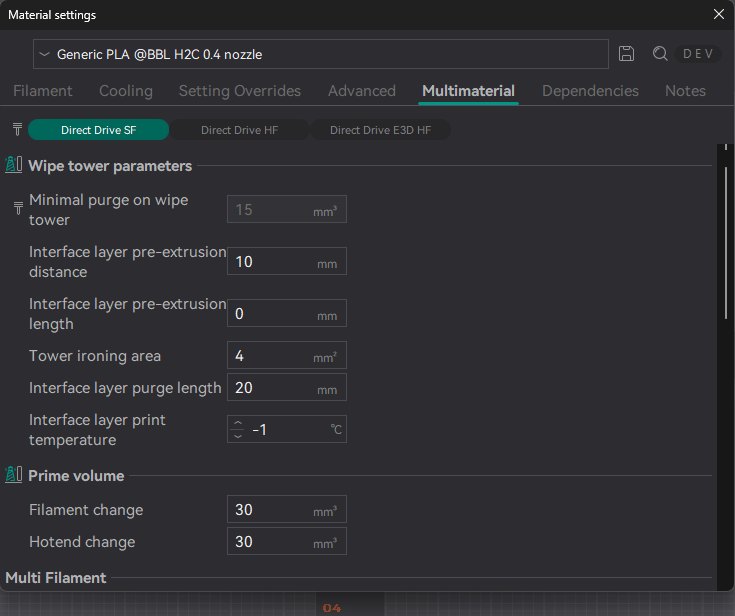
Every Bambu Lab printer uses what OrcaSlicer calls the Type 1 prime tower. On that tower the process setting Prime volume did nothing, because the tower purges each filament’s own prime volume, and no settings page showed that value.
2.5.2 adds a Prime volume group to each filament’s Multimaterial page. Filament change sets how much the tower purges when the filament changes. Hotend change does the same when the hotend changes, and only shows on printers whose extruder holds more than one nozzle, such as the H2C. Projects slice exactly as before until you change a value.
The release notes give a real example. On an H2D printing two filaments, setting Filament change to 10 mm³ instead of the profile’s 30 cut the tower from 3.26 m of filament to 1.95 m.
| H2D, two filaments | Filament change | Prime tower filament |
|---|---|---|
| Profile value | 30 mm³ | 3.26 m |
| Lowered | 10 mm³ | 1.95 m |
The crash fixes
Since 2.5.0, some projects that 2.4 sliced crashed OrcaSlicer while slicing. Those slice again, and a region the slicer can’t build toolpaths for is now skipped and logged instead of crashing the whole job.
Three more crashes are gone: an object with nothing on its first layer while the prime tower is on, a 3D view that can’t start OpenGL, and a project that assigns a filament to a nozzle the printer doesn’t have. On Windows, the OpenGL case now shows a message with what to check, and names the graphics adapter when it can find it.
Slicing and import fixes
These are the fixes most people will notice. The smoothed infill one only changes files sliced at a resolution finer than 0.005 mm, and the notes say the infill printed about 7 percent faster in a simulation of Klipper‘s planner.
| Area | What 2.5.2 fixes |
|---|---|
| STEP import | Since 2.5.0, some STEP files came in with faces missing. They import complete again |
| Arrange | Parts nearly as wide as the bed, such as 250 mm parts on the A1’s 256 mm bed, arrange again |
| Smoothed infill | Very fine resolutions no longer split corners into thousands of tiny moves. One test went from 656,000 moves to 286,000, and from 28 MB to 18 MB |
| Top surfaces | With Only one wall on top surfaces, inner walls under the top infill are now cut back or dropped |
| Tree Hybrid support | An expanded first layer is trimmed to the bed instead of running past the plate |
| Measure tool | Stretched objects get the right angles, and an ellipse is no longer measured as a circle |
| Linux AppImage | No more freezes on Wayland, a problem since 2.5.0 |
| Device tab | The printer’s web page loads only when you open the tab |
Printer profiles and connections
Two printer profiles change in ways owners should know about. Many Prusa CORE One and CORE One L process presets had their overhang speeds in the wrong slots, so a steeper overhang could print faster than a gentle one. The speeds now sit in the right slots, with the values unchanged.
On the Snapmaker U1, Height to rod drops from 27.5 to 26 mm and Distance to rod becomes 41.2 mm, from Snapmaker’s own CAD measurements. When printing by object, OrcaSlicer now refuses a plate where an object between 26 and 27.5 mm tall shares a Y band with one printed after it. Nick’s U1 review covers the printer itself.
Filament sync finds the CFS Lite slots on a Creality SPARKX i7 again, after 2.5.1 broke it. On printers whose Device tab shows the printer’s own web page, that page no longer loads in the background. The notes say that on a Creality K2, each open copy of OrcaSlicer was costing the printer about 14 percent of a CPU core.
Who should update
Anyone on 2.5.0 or 2.5.1 who has hit a crash, a broken STEP import or an arrange that wouldn’t fit. Bambu Lab owners who want a smaller prime tower get the new setting, and CORE One and U1 owners get corrected profiles.
Download 2.5.2 from OrcaSlicer’s GitHub releases page. If you’re choosing between slicers, our OrcaSlicer vs Bambu Studio guide covers the differences, and Bambu Lab’s own slicer just had an update too: Bambu Studio 2.9.2.
Watch Planet 3DP on YouTubeSlicer and firmware releases, explained for the people who print with them.
Subscribe- OrcaSlicer on GitHub: V2.5.2 Official Release notes (checked November 24, 2026)
- OrcaSlicer on GitHub: releases, with 2.5.1 dated November 14, 2026 (checked November 24, 2026)

Host of Planet 3DP. 3D printing for over four years, with tens of thousands of print hours on Bambu Lab, Anycubic, Creality, Elegoo and Snapmaker machines. Planet 3DP on YouTube.
Last checked November 24, 2026.