
Some links on this page are affiliate links. If you buy through one, Planet 3DP earns a small commission at no extra cost to you. It never changes what we recommend. How this works. As an Amazon Associate I earn from qualifying purchases.
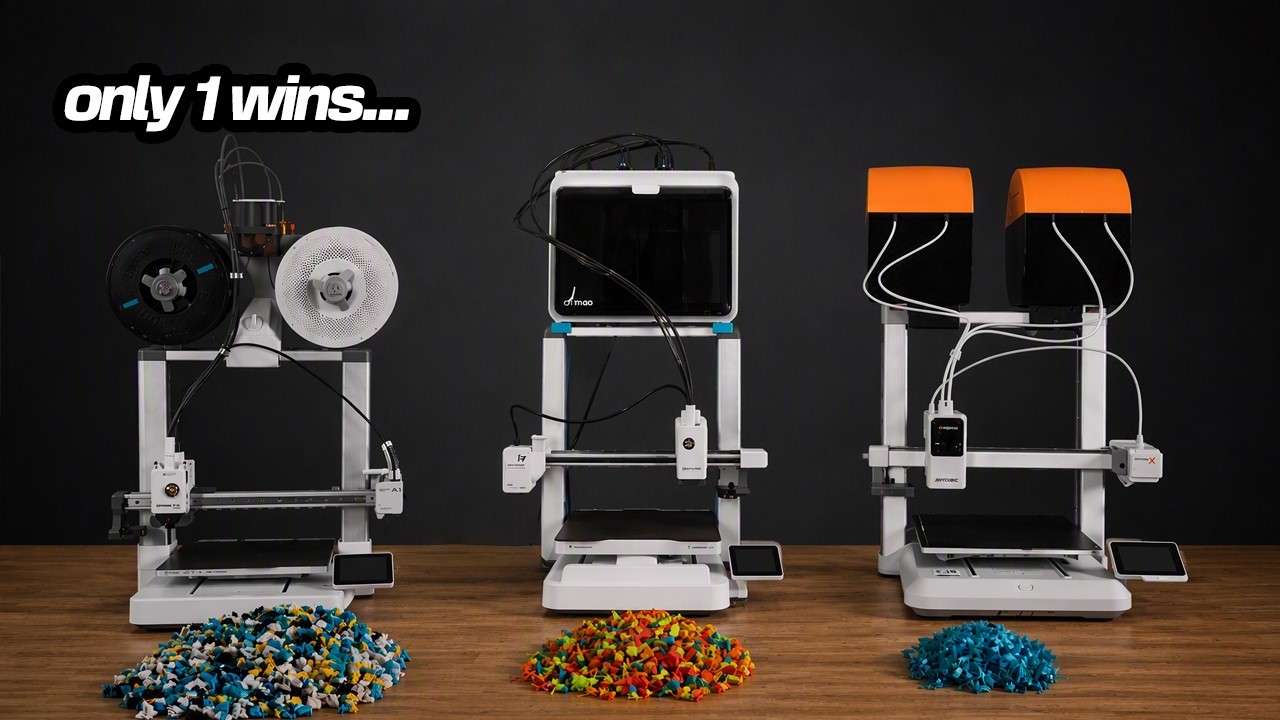
Picking your first 3D printer is harder than it should be. Every brand says theirs is the easiest to use. After running printers from just about every major brand, I narrowed it down to the ones I’d actually hand to a beginner in 2026, and I ran all of them side by side.
- Safest pick
- Bambu Lab A1 Combo, $399
- Fastest setup
- Creality SparkX i7 with the CFS, $359
- Cheapest multicolor
- Anycubic Kobra X, $349
- Prices
- List prices I checked on August 20, 2026. They move a lot, so check before you buy.
Watch the full comparison
What actually matters on a first printer
Most people shop on the wrong numbers. Print speed on a spec sheet doesn’t matter much for your first machine, and neither does build volume. Here’s what does.
| What I judged | The question it answers |
|---|---|
| Out of the box | How long from opening the box to your first print? A painful setup is where most people quit. |
| Reliability | Does it just work, or do you fight it every time you hit print? |
| Total cost | The printer plus filament, tools and your first year of supplies, not just the sticker price. |
| Ecosystem | When something goes wrong (and it will), is there an app, a big community and videos to get you printing again? |
Bambu Lab A1 Combo
Pick it if you want the most proven printer here.
- On the market since December 2023
- Print farms run hundreds of them around the clock
- Four colors with the AMS Lite
$399, list price checked August 20, 2026
Check price at Bambu LabCreality SparkX i7 with CFS
Pick it if you want the quickest setup and newer features.
- About five minutes from box to printing
- Hardened steel nozzle from the factory
- AI camera that stops failed prints
$359, list price checked August 20, 2026
Check price on AmazonAnycubic Kobra X
Pick it if you’ll print a lot in multicolor.
- Multicolor built into the toolhead
- About half the purge of a separate box system
- Expands to 19 colors with add on units
$349, list price checked August 20, 2026
Check price at AnycubicBambu Lab A1: the one that’s been proven
The A1 launched in December 2023, so it’s been out for well over two and a half years. That matters. The bugs are worked out, the firmware is mature, and the community has found every quirk. There are print farms running hundreds of these all day, every day. You won’t find stronger proof of reliability at this price.
I own several A1s and A1 Minis and I’ve put thousands of hours on them with very few issues. Setup takes about 25 minutes, then you scan the QR code on the screen and you’re printing about ten minutes later. My daughter built hers in a little over 20 minutes while asking plenty of questions.
The ecosystem is where Bambu pulls ahead. Bambu Studio is the slicer, the Bambu Handy app makes printing from your phone easy, and MakerWorld has a huge library of free models. Bambu filament costs a little more, but it’s detected automatically and tracked in the app, which is a real convenience.
What I’d change: the AMS Lite sits out in the open, so loaded filament picks up moisture. It’s an open frame printer too, so ABS and ASA are off the table. Most beginners never print those anyway.
Creality SparkX i7: the fastest setup I’ve done
SparkX is Creality’s new sub brand, built from the ground up for beginners. The i7 was announced at CES in January 2026, so it’s newer, but it’s been out long enough for real reviews. The build volume is 260 x 260 x 255 mm, basically the same as the A1.
Creality claims a five minute setup and I agree with them. You install the CFS, turn it on and go. It’s the most put together open frame printer I’ve ever unboxed.
It ships with a hardened steel nozzle, which almost nothing at this price includes. That means carbon fiber PLA and glow in the dark filament work out of the box. The AI camera catches failures before you waste a roll, and the CFS keeps your filament enclosed instead of sitting in the open.
There are three ways to buy it, which gets confusing, so here they are side by side. I compared the full CFS version.
| Version | List price | Multicolor |
|---|---|---|
| SparkX i7 | $259 | None |
| SparkX i7 with CFS Mini | $279 | CFS Mini |
| SparkX i7 with CFS | $359 | Full CFS, enclosed |
What I’d change: the screen is tiny and a bit sluggish, and the SparkX community is still small, so answers take longer to find. Only some Creality filaments have RFID so far, so you’ll often type in the type and color yourself. That takes about ten seconds.
Anycubic Kobra X: multicolor right in the toolhead
The Kobra X started shipping in late February 2026, so it’s the newest here. It does something the other two don’t. Multicolor is built into the print head itself. Four spools sit on top and feed straight in, with no separate box. Anycubic calls it ACE Gen 2.
My first hour with it was rough. The built in Benchy file failed three times on three different filaments. Then I sliced a Benchy myself on my computer, sent it, and it printed perfectly the first time. The problem was the files stored on the printer, not the printer. I haven’t had an issue since.
If you buy one: skip the preloaded files on the printer. Slice your first print yourself and send it.
It arrives mostly assembled and you’ll be printing in about 20 minutes. If you want more colors later, you can add up to four of Anycubic’s extra multicolor units for up to 19 colors on one print, which neither of the others can do. I printed my own enclosure for the top spools for under ten dollars of PETG.
What I’d change: it’s new, and the toolhead system is brand new too. It hasn’t had years of abuse like the A1. Anycubic has a solid track record, but only time will tell on this one.
The real cost of multicolor printing
Every color change pushes old filament out of the nozzle before the new color loads. On the A1 that purge is about 73 mm per change. The Kobra X cuts the filament much closer to the nozzle, so it purges about 35 mm, roughly half. The i7 lands in between.
I printed the same dragon on all three and weighed the waste.
Now say you print ten of those a month. At about $15 a roll, that’s roughly 1.5 cents a gram. The Kobra X wastes about $11.40 a month and the A1 about $34.50. Over a year that’s about $136 against $414, a gap of roughly $278. That’s more than the price difference between the printers.
Every print is different, so treat these as real world examples, not promises. If you’ll print a lot in multicolor, that’s the number that should decide it.
Side by side
| Bambu Lab A1 Combo | SparkX i7 + CFS | Anycubic Kobra X | |
|---|---|---|---|
| List price | $399 | $359 | $349 |
| Setup time | About 25 minutes | About 5 minutes | About 20 minutes |
| Multicolor | AMS Lite, open | CFS, enclosed | Built into the toolhead |
| Dragon print waste | 230 g | 128 g | 76 g |
| Standout | Proven by print farms | Hardened steel nozzle | Lowest purge waste |
| Watch out for | Filament sits in the open | Small screen, small community | Newest, least proven |
What else you need to get started
The printer isn’t the whole bill. Plan on $60 to $100 of PLA to start, and more if there’s a sale. Add flush cut snips and a wooden chisel set for removing supports, around $20 if you don’t own them.
If you’re still at square one, start with getting started with 3D printing.
Free beginner packShopping list, a 30 day plan, a filament cheat sheet and a one page failure guide.
Get the free PDFCommon questions
Which 3D printer should a beginner buy in 2026?
Any of these three is a great first printer. Pick the Bambu Lab A1 if you want the most proven option, the Creality SparkX i7 if you want the fastest setup and a hardened nozzle, or the Anycubic Kobra X if you’ll do a lot of multicolor printing.
Do I need an enclosed 3D printer to start?
No. All three here are open frame printers. You need an enclosure for materials like ABS and ASA, and most beginners never print those.
How much filament does multicolor printing waste?
On one multicolor dragon print I measured 76 g of waste on the Kobra X, 128 g on the SparkX i7 and 230 g on the A1. At ten prints a month that’s a gap of roughly $278 a year between the best and worst.
How much does it cost to get started beyond the printer?
Plan on $60 to $100 of PLA and about $20 for snips and a chisel set for supports.
- Planet 3DP video: I Ran All 3 Of The Best Beginner 3D Printers (Aug 22, 2026) (checked October 7, 2026)
- List prices as verified in the video description (checked August 20, 2026)
Host of Planet 3DP. I’ve been 3D printing for over four years, with tens of thousands of print hours on Bambu Lab, Anycubic, Creality, Elegoo and Snapmaker machines. Everything here comes from my own hands on testing. Planet 3DP on YouTube.
Last checked October 7, 2026.