

Some links on this page are affiliate links. If you buy through one, Planet 3DP earns a small commission at no extra cost to you. It never changes what we recommend. How this works.
This Mandarin fish has 5,349 color changes in it. The Dilophosaurus next to it has 5,753, and it printed for a little over 2 days without skipping a beat. A Dune popcorn bucket that took my A1 over 4 days came off the P3C in under 2. All in, I’ve put over 15,000 color changes through Bambu’s new P3C since the middle of October. I’ll tell you right now, it’s fast. There’s 1 thing about it I wish was different, and I’ll get to that.
- Verdict
- The fastest multicolor printing I’ve done. It’s on my list of printers to buy more of once my new studio is built.
- Price
- $1,149 for the AMS Combo: the printer, the AMS 3P on top and 5 PrintTools. Bambu’s launch price, checked November 24, 2026.
- Biggest win
- On the fish, my H2C takes 2 and a half times as long. The more often a print changes color, the bigger the gap.
- The 1 thing
- You load and unload filament by hand. Every color change during a print is automatic, but new rolls are on you.
- Who it's for
- Multicolor figurines and detailed models in PLA, PETG and TPU, and anyone selling prints. Big ABS or ASA parts belong on the H3C.
Watch the full review
Bambu sent me the P3C over a month before launch so I could test it out. Everything on this page comes from my own time with it. If you want to know how it stacks up against the H3C, I’ve got a full comparison video on that. There’s a short version further down this page.
How much room you need for it
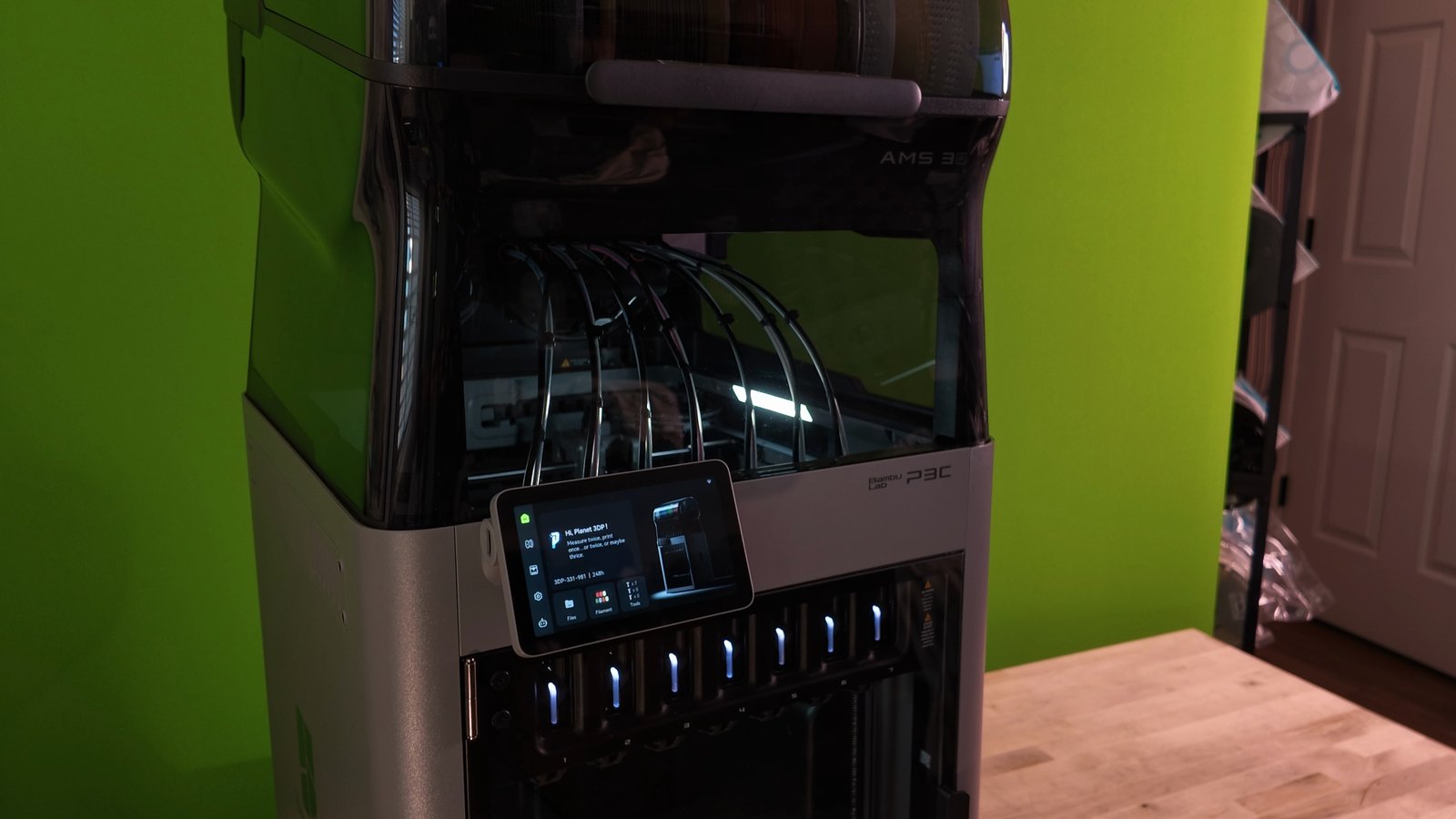
The first thing you’ll notice is that the AMS sits right on top of the printer. All 7 of your spools live up there instead of off to the side, like on some of the other toolchanger printers. It’s fully enclosed, so your spools stay sealed up and protected from moisture.
As for how big it prints, the build plate is 256 mm cubed, the same as my A1, X2D or P2S. Mine sits on a low butcher block end table, so I can reach the AMS without a step stool.
How it changes colors so fast
On a regular Bambu with 1 nozzle, like my P2S, every color change is a whole routine. It pulls the old filament all the way back, feeds the new one in, and pushes out a little pile of the old color before it can keep printing.
The P3C has 7 slots for little print heads instead, called PrintTools, and it comes with 5 of them in the box. Each one has its own nozzle, its own heater, its own temperature sensor, and its own filament loaded the whole time. Each one is basically a little hotend on its own. The printer just grabs whichever color it needs off the rack. That’s the whole trick.
The rack drops down when it’s time to swap, then lifts back up out of the way. That keeps the filament tubes off your print, and you can still see what’s printing from the front. While it’s printing with one tool, it’s already heating up the next one. It’s ready to go the second it gets picked up.
Each tool has a little light on it. White means it’s parked, orange means it’s warming up, and flashing red means something’s wrong. The nozzles are all hardened steel, so you can run carbon fiber and glass fiber filaments through any of them.
Every color change is just fast. When a print has thousands of them, that adds up quick.
The race: 4 prints against my H2C and my A1
To see how much it really adds up, I took 4 of my multicolor prints. I compared the P3C against my H2C, and against my A1 when it could handle them. The P3C times are from prints I actually ran, the popcorn bucket is the one I could run on all 3 printers so those 3 times are real, and the other H2C and A1 times come from Bambu Studio’s estimates. The table runs from the smallest gap to the biggest.
| Color changes | A1 | H2C | P3C | H2C took | |
|---|---|---|---|---|---|
| Dune popcorn bucket, 3 colors, 1,175 g | 1,853 | 4 days 1 hour | 2 days 17 hours | 1 day 21 hours 20 minutes | About 1.4 times as long |
| Nano Tyrannus | 821 | 1 day 10 hours | 21 hours 20 minutes | 12 hours 32 minutes | About 1.7 times as long |
| Dilophosaurus, more than 4 colors | 5,753 | Can’t print it (the A1 tops out at 4 colors) | 4 days and almost 10 hours | 2 days 5 hours | Twice as long |
| Mandarin fish, 6 colors | 5,349 | Can’t print it | Over 3 and a half days | Just under 1 day 11 hours | 2 and a half times as long |
The popcorn bucket is a big print that filled the entire plate. There’s a lot of printing in between each color change, which is why its gap is the smallest. The Nano Tyrannus came in almost 9 hours faster than the H2C and almost a whole day faster than the A1. The Dilophosaurus has the most color changes of anything I’ve printed on it. The P3C saved me over 2 days on that 1 print. Then the fish.
Here’s the pattern. Every time a print changes color more often, the P3C pulls further ahead.
The fish changes color more often than any of the others, so if that pattern held, it should have been the biggest gap yet. And it was. The P3C finished it in just under 1 day and 11 hours, which means the H2C takes 2 and a half times as long, and the P3C saved me over 2 days again.
So what really decides how much time you save is how often a print changes color. The popcorn bucket has more than twice as many color changes as the Nano Tyrannus, but they’re spread out over a huge print, so the gap was smaller. That’s 4 prints. It’s what I’ve seen on mine.
What all those color changes cost
Speed is great, but all of those color changes have to cost something. So let’s talk about waste, and whether anything went wrong.
That’s over 15,000 color changes on this printer, and almost 14,000 of them were on these 4 prints alone. Each tool keeps track of its own data, like how many hours it’s run and how many times it’s been swapped. The Dilophosaurus by itself was 5,753 of those over 2 days. It never skipped a beat on a single tool swap. Not one.
Out of all of these prints, the only failure I had was on the fish, where a support under one of its fins came loose. You can hardly even notice it.
Now for the waste. On the A1, the popcorn bucket’s color changes added up to 430 grams. That’s almost half a roll of filament that never made it into the print. On the P3C every color has its own tool, so nothing gets pushed out of a nozzle between color changes. My goal for this review was to push the P3C with 7 color prints, and the only other machine of mine that could keep up with that is the H2C. I can’t imagine what the waste pile would look like for 14,000 color changes on a single nozzle printer. This is why the H3C and the P3C are printing on a whole new playing field.
Loading filament, the part you do by hand
Now for the thing I mentioned at the start, the part you’ll do every time you load a new roll.
You put the spool in the AMS and tap Reread on that spool on the screen so it reads the filament. If it isn’t Bambu filament, you select the type and color yourself. Then you hit load and feed the filament in by hand until the extruder grabs it. There’s a little window on each tool where you can watch it go in, so you know it made it. Unloading is by hand too. It cuts the filament and then you pull it out. That’s it.
If you’re loading a bunch at once there’s a batch option, but doing all 7 slots still takes close to 10 minutes. Bambu has told me they’re working on speeding that up quite a bit.
The good news: you only do this when you swap out a roll. Each tool keeps its filament loaded, so every color change during a print is automatic.
Watch Planet 3DP on YouTubeThe full loading walkthrough, the H3C comparison and the SwapTek vs INDX video are all on the channel.
SubscribeReally soft TPU
The regular tools that come in the box already print TPU down to 85A.
For anything softer, the P3C can run thicker 2.85 mm filament with an extra tool. That’s what lets it print TPU as soft as 75A, about as squishy as a shoe insole. Bambu says that thicker filament also lets it print flexible material up to 5 times faster. Soft TPU doesn’t like going through long tubes, so the AMS has a bypass that feeds it straight in. Right now 75A is the only 2.85 mm filament you can buy. Bambu says more soft ones are on the way.
I have the 2.85 tool here, but I didn’t put it to work for this review, so I can’t tell you how it prints yet. Not yet.
P3C, H3C or H2C
Bambu says the P3C has the exact same tool changer as the H3C, with the same 6 second swaps. But the H3C is $2,499, so it’s $1,350 more than the P3C, and for that it prints bigger, runs 9 tools, gets hotter, has a heated chamber, and loads filament for you. You can add the dryer kit to the P3C later. There’s no upgrade that gets it a bigger print size, higher temperatures or automatic loading. None.
The H2C is the one I was running before this, and it has a heated chamber too. It swaps out nozzles, but it still has to pull the filament back out every time it changes colors. That’s why it lost every one of these comparisons. It also can’t print multicolor all the way out to the edges of the plate.
| P3C | H3C | |
|---|---|---|
| Tool changer | SwapTek, about 6 second swaps | The same SwapTek, about 6 second swaps |
| Tool slots | 7, with 5 PrintTools in the box | 9 |
| Heated chamber | No | Yes |
| Nozzle and bed | 300 and 100 degrees | Hotter |
| Filament loading | By hand | Automatic |
| Filament dryer | Extra kit, 2 slots, up to 65 degrees | Built in, up to 85 degrees |
| Build size | 256 mm cubed | Bigger |
| Price | $1,149 AMS Combo | $2,499 |
So who should buy it?
If the prints you love have a ton of colors, like figurines and detailed multicolor models, this is where the P3C really earns it. The more often a print changes color, the more time it saves you.
If you mostly print PLA, PETG and TPU and you love multicolor, the P3C gets you this tool changer without spending H3C money. Same if you’re making things to sell. If 5 colors gets you going, the other 2 tools are an upgrade you can add later as you need them.
If you print a lot of ABS, ASA or nylon, or you print big parts, I’d go with the H3C. Same if you just want everything ready to go on day 1, with no feeding filament by hand.
And at $1,149, you could have 2 P3Cs running side by side for $2,298. That’s about $200 less than 1 H3C. Once my new studio is built and I’ve got the room, the P3C and the H3C are both on my list.
What’s the model with the most color changes you’ve ever seen? Send it to me in the comments on the video and I’ll run it on the P3C. The most I’ve done so far is the Dilophosaurus at 5,753, so that’s the one to beat.
Common questions
How fast is a color change on the Bambu Lab P3C?
Bambu says about 6 seconds. On mine I measured 6 to 7 seconds for a full swap. The printer heats the next tool while it’s still printing with the current one.
How many colors can the P3C print?
It has 7 slots for PrintTools and comes with 5. The other 2 are an upgrade. On most of the detailed models I print, I end up using all 7.
Does the P3C load filament automatically?
No. You feed each roll in by hand until the extruder grabs it, and you pull it out by hand after it cuts. Loading all 7 slots with the batch option takes close to 10 minutes. Every color change during a print is automatic, because each tool keeps its filament loaded.
How much faster is the P3C than the H2C?
On my 4 prints the H2C took between 1.4 and 2.5 times as long. The gap grows with how often the print changes color. That ran from about 40 changes an hour on the popcorn bucket to about 150 an hour on the Mandarin fish.
Can the P3C print ABS or ASA?
There’s no chamber heater, the nozzle tops out at 300 degrees and the bed at 100. Bambu’s own guide suggests 100 to 110 on the bed for ABS, so the P3C is right at the bottom of that range. For a lot of big ABS or ASA parts I’d go with the H3C.
Is the P3C worth it over the H3C?
They share the same tool changer. The H3C is $1,350 more for a bigger print size, 9 tools, higher temperatures, a heated chamber and automatic loading. If you don’t need those, 2 P3Cs cost $2,298, about $200 less than 1 H3C.
Does the P3C come with a filament dryer?
No. The dryer is an extra kit with its own power adapter. It dries 2 of the slots, number 2 and number 4, up to 65 degrees while you print.
- Planet 3DP video: Bambu Lab P3C review (checked November 24, 2026)
- Bambu Lab: P3C product page (checked November 24, 2026)
- Bambu Lab: H3C product page (checked November 19, 2026)

Host of Planet 3DP. I’ve been 3D printing for over four years, with tens of thousands of print hours on Bambu Lab, Anycubic, Creality, Elegoo and Snapmaker machines. Everything here comes from my own time with the P3C. Planet 3DP on YouTube.
Last checked November 24, 2026.