

Some links on this page are affiliate links. If you buy through one, Planet 3DP earns a small commission at no extra cost to you. It never changes what we recommend. How this works.
TPU filament is the flexible one: it bends, stretches and springs back. The short answer on which to buy depends on your feed path. On a Bambu Lab printer with an AMS, buy Bambu’s TPU for AMS, a harder 68D grade that Bambu says works in every AMS. Feeding from an external spool? A 95A TPU is the usual starting point. Softer 85A is for squishy parts, and only on printers and nozzles that allow it.
Most TPU guides treat it as one material. Bambu’s own tables treat it as five, with different rules for each printer, nozzle and AMS. Pick the wrong grade and Bambu’s own tables say it won’t feed. This guide goes deeper than the TPU section of our complete filament guide, model by model.
None of the brands below has been reviewed by Nick, so every pick is labelled not tested by Nick. He has run TPU on his X2D, and that experience is quoted further down.
The short answer
- Bambu printer with an AMS
- Bambu TPU for AMS (68D). $38.99 list with spool, on sale for $23.39 when checked November 12, 2026. Not tested by Nick
- Bambu 95A for an external spool
- Bambu TPU 95A HF. $41.99 list, on sale for $25.19 when checked November 12, 2026. Not tested by Nick
- Budget 95A
- SUNLU TPU 95A. Check the current price. Not tested by Nick
- Another maker to know
- Polymaker PolyFlex TPU95, with full print settings on its wiki
- Don't
- Run 95A or softer TPU through an AMS, AMS lite or AMS 2 Pro
Prices from Bambu Lab’s US store, read November 12, 2026. Compatibility from Bambu Lab’s wiki, read the same day.
TPU filament hardness: 95A vs 85A, and where 68D fits
TPU hardness is measured on the Shore scale. Bambu’s wiki puts it simply: a lower number means a softer material, and the letter is the test scale. Most TPU uses Shore A.
Here’s the part that trips people up. Bambu ranks common grades from hard to soft as 77D, 70D, 68D, 55D, then 95A, 90A, 85A and softer. So 68D is harder than 95A, even though the number is smaller. That extra stiffness is why Bambu’s TPU for AMS can go through an AMS and 95A can’t.
Hardness isn’t the whole story. Polymaker notes that infill, wall count and layer height also decide how flexible the finished part feels.
| Bambu grade | Where it sits | 0.4 mm standard nozzle | AMS automatic feeding |
|---|---|---|---|
| TPU for AMS (68D) | Hardest here. Bambu lists cases, phone covers, door stoppers and sports gear | Yes | Yes, every AMS |
| TPU 95A HF | Soft and flexible, with high impact resistance, by Bambu’s account | Yes | No |
| TPU 90A | Shoe soles, sports parts, phone cases, watch bands | Yes | No |
| TPU 85A | Softest 1.75 mm grade Bambu sells | No (0.6 or 0.8 mm) | No |
| TPU 75A (2.85 mm) | Softer still, on a different filament size | No (2.85 mm hotend only) | No |
How to print TPU on each Bambu Lab printer
Bambu’s compatibility table groups printers into series. The P series covers the P1S and P2S, and the H2 series covers the H2C. Nick hasn’t printed TPU on any of these except the X2D, so every line here comes from Bambu’s wiki.
| Printer | 85A | 90A | 95A HF | TPU for AMS |
|---|---|---|---|---|
| Bambu Lab A1 and A1 mini | No | Yes | Yes | Yes |
| P1S and P2S | Yes | Yes | Yes | Yes |
| H2C, H2D, H2S | Yes | Yes | Yes | Yes |
| A2L | Yes | Yes | Yes | Yes |
| H3C | Yes | Yes | Yes | Yes |
A1 and A1 mini
Use 90A, 95A HF or TPU for AMS. Bambu marks 85A as not compatible with the A1 series.
For 90A, Bambu’s A1 guide gives 225°C at the nozzle and a 30 to 35°C bed. Keep the default max volumetric speed and turn off flow dynamic calibration. Skip tall, thin models, because soft TPU wobbles as it gets taller.
Feed from an AMS HT through its TPU outlet, or from a sealed dry box raised above the printer. Unloading is manual at 250°C. The cutter can’t do it. And because the A1 is open, you can’t dry filament on its bed.
P1S and P2S
All four 1.75 mm grades work. The 85A goes straight into the extruder from above, not through the PTFE tube. 90A can run through a PTFE tube from a sealed box beside the printer.
Bambu suggests 225°C and a 30 to 35°C bed for both, with the default volumetric speed limit. Unload by hand at 250°C. Bambu also sells an optional TPU Feeding Assist Module for the H2, X and P series. More on these two in our P2S vs P1S comparison.
X2D
The Bambu Lab X2D has its own TPU guide. TPU prints only on the main nozzle on the left. Bambu says the right auxiliary extruder has too much feed resistance.
For 95A HF, Bambu moves the external spool holder to the other side and runs about 175 mm of PTFE tube into the left extruder. For 90A and 85A it wants a top mounted spool holder or the feed assist module. The suggested settings for 85A and 90A are 225°C, a 30 to 35°C bed and no chamber heating.
H2C
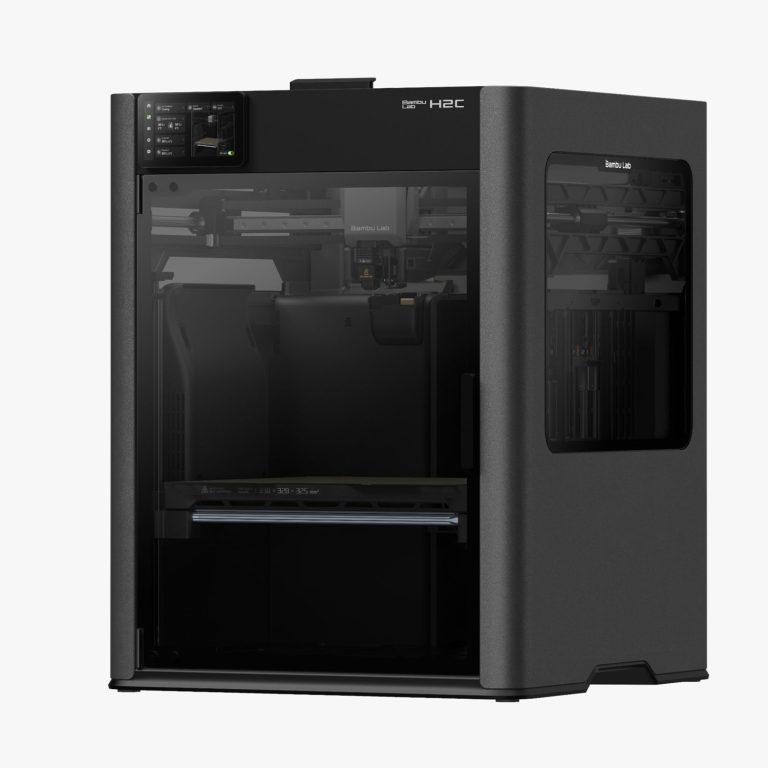
Bambu says the H2S and H2C load TPU the same way as the H2D. Its steps use the right hotend, and for 85A the H2D and H2C can only feed from the right. 90A and 95A run through a PTFE tube to a dedicated TPU inlet at the back. 85A goes straight into the extruder. Our H2C review covers the rest of the machine.
Can you print TPU in an AMS?
Only Bambu’s TPU for AMS goes through regular automatic feeding. That applies to every AMS model, by Bambu’s table. Softer grades are a different story.
| AMS | TPU for AMS (68D) | 95A HF, 90A, 85A |
|---|---|---|
| AMS | Yes | No |
| AMS lite | Yes | No. Bambu’s FAQ allows only 77D, 55D or harder |
| AMS 2 Pro | Yes | No |
| AMS HT | Yes | Only through the TPU outlet on the back, as a sealed box |
| AMS 3H (H3C) | Yes | Only through the filament bypass port |
The AMS HT line is the one people miss. It can hold and dry a spool of 95A, but you don’t use its feeding. You pull the filament out of a short, bent PTFE tube in the rear plug and feed the printer by hand.
Nick learned the AMS 2 Pro rule the hard way. In his X2D engineering filament test he forced TPU through the AMS 2 Pro. It rippled and kept jamming at the same spot at the rear of the AMS. He had to pull the rear tube off and cut the filament to get it out. He then ran a generic TPU from an external spool into the left nozzle, and it printed well. The TPU round starts at 8:59.
Free filament pairing guideEvery filament from Nick’s X2D test, the support to run against it and the temperatures, on one page.
Get the free guideHow to print TPU: the settings that matter
Start from the slicer’s preset for your exact filament. Then change one thing at a time. These are the makers’ own numbers, not ours.
| Setting | Bambu Lab (wiki) | Polymaker PolyFlex TPU95 (wiki) |
|---|---|---|
| Nozzle | 200 to 250°C, plus or minus 10. 225°C in its 85A and 90A guides | 210 to 230°C |
| Bed | 30 to 35°C Engineering Plate, 35 to 45°C PEI plates | 25 to 60°C |
| Speed | Keep the default volumetric speed limit | 30 to 50 mm/s |
| Retraction | Tune in 0.2 mm steps | 3 to 6 mm |
| Fan | Not stated | On |
| Plate | Not the Cool Plate SuperTack. Glue except on Textured PEI | PC or Textured PEI, glue when needed |
| Supports | PLA | PolySupport or PolyDissolve S1 |
Polymaker strongly recommends a direct drive printer for TPU95. Its wiki says the further the extruder sits from the hotend, the slower you’ll need to print.
Nozzle history matters too. Bambu recommends a new nozzle, or a cold pull on a used one. It also advises against a nozzle that has printed carbon or glass fibre filament, because leftover fibres raise extrusion resistance.
Supports: Bambu suggests PLA as the support for TPU. TPU supporting itself tangles and is hard to remove. In Nick’s X2D test, PETG came out slightly cleaner than Support for PLA as the interface.
TPU printing tips: common problems and Bambu’s fixes
| Problem | What Bambu suggests |
|---|---|
| Small holes in the surface | Dry the filament. Cut retraction 0.2 mm at a time |
| Stringing and oozing | Dry it. Print By object, not By layer. If it leaks, add 0.2 mm of retraction |
| Under extrusion | Lower feeding resistance, dry the spool, cold pull the nozzle |
| Messy support surfaces | Use PLA as the support, not TPU |
| Print stuck to the plate | Lift a corner, spray alcohol into the gap, then ease it off |
For problems that aren’t TPU specific, see our guide to common 3D printing problems.
Dry TPU before you print it
Bambu marks drying as required for every TPU it sells. Wet TPU strings, bubbles and bonds badly.
| Method | 85A and 90A | 95A HF and TPU for AMS |
|---|---|---|
| AMS 2 Pro | 65°C, 12 h (may not fully dry) | 65°C, 12 h (may not fully dry) |
| AMS HT or AMS 3H | 75°C, 18 h | 75°C, 18 h |
| Convection oven | 70°C, 8 h | 70°C, 8 h |
| Heatbed (H, X, P1S, P2S) | 90°C, 16 h | 80 to 90°C, 12 h |
The AMS 2 Pro tops out at 65°C, which Bambu says is lower than TPU needs. Use the heatbed, an AMS HT, an AMS 3H or an oven instead.
Watch the spool width. Bambu measured a TPU spool growing from about 65.4 mm to about 69.4 mm after drying. Its 4 L dry box fits spools up to about 67.5 mm, so it recommends the 5.8 L box, which takes about 108.5 mm.
Need a dryer? Compare them in our best filament dryers guide, or see current prices on the filament dryer deals page.
Best TPU filament: the picks
These are picks by job, from the makers’ own pages. Nobody here has run them head to head, so there’s no single winner.
Bambu Lab TPU for AMS
Best for any Bambu printer with an AMS. Not tested by Nick.
- Shore 68D, so it feeds like a rigid filament
- Works with every AMS series, by Bambu’s store page
- Bambu claims up to 60% faster printing than its TPU 95A HF
- 0.2 mm nozzle not compatible. Dry before use
- Refill without spool: $34.99 list, on sale for $20.99 when checked November 12, 2026
$38.99 list for 1 kg with spool (on sale for $23.39), list price checked November 12, 2026
Check price at Bambu LabBambu Lab TPU 95A HF
Best Bambu 95A for an external spool or the AMS HT outlet. Not tested by Nick.
- Soft and flexible with high impact resistance, by Bambu’s account
- Bambu says it prints 3 times faster than standard TPU 95A
- Not compatible with any AMS series for automatic feeding
- Two colours were out of stock when checked
$41.99 list for 1 kg with spool (on sale for $25.19), list price checked November 12, 2026
Check price at Bambu LabSUNLU TPU 95A
A budget 95A for any printer with a direct feed path. Not tested by Nick.
- A 95A grade, so treat it like any 95A: external spool, never the AMS
- SUNLU’s store refused our request today, so no price or spec is printed
- Check the current price on SUNLU’s store
Polymaker PolyFlex TPU95
A well documented 95A from a maker outside Bambu. Not tested by Nick.
- Shore 95A. Polymaker says it stretches to over three times its length
- 210 to 230°C nozzle, 30 to 50 mm/s, fan on, 70°C for 8 h to dry
- Polymaker’s TPU90 is softer, and its TPU95 HF sits closer to 98A
- No store link here yet. Search Polymaker’s own shop
Our filament deals page tracks TPU prices alongside PLA, PETG and the rest. Still choosing a material? Start with PLA vs PETG vs ABS.
TPU filament questions
Can you print TPU in the AMS?
Only Bambu’s TPU for AMS, a 68D grade, works with regular AMS feeding. 95A, 90A and 85A don’t work in the AMS, AMS lite or AMS 2 Pro. The AMS HT can hold them as a sealed box, fed through its rear TPU outlet.
What is the difference between 95A and 85A TPU?
85A is softer. On Bambu printers it needs a 0.6 or 0.8 mm nozzle, and Bambu marks it not compatible with the A1 series. 95A is stiffer and runs on a 0.4 mm nozzle.
What temperature should I print TPU at?
Bambu’s material table gives 200 to 250°C for its TPU, and its 85A and 90A guides suggest 225°C with a 30 to 35°C bed. Polymaker gives 210 to 230°C for PolyFlex TPU95.
Can the Bambu Lab A1 print TPU?
Yes, with 90A, 95A HF or TPU for AMS. Bambu lists 85A as not compatible with the A1 series. The AMS lite only takes TPU for AMS.
Do you need to dry TPU?
Bambu marks drying as required for all its TPU. Its table gives 70°C for 8 hours in a convection oven or 75°C for 18 hours in an AMS HT.
Is TPU food safe?
Bambu’s wiki says its TPU is not food contact grade and printed parts shouldn’t hold or touch food.
- Bambu Lab wiki: TPU Printing Guide (checked November 12, 2026)
- Bambu Lab wiki: X2D TPU printing guide (checked November 12, 2026)
- Bambu Lab wiki: TPU 85A and 90A guide for the P series (checked November 12, 2026)
- Bambu Lab wiki: TPU 90A guide for the A1 series (checked November 12, 2026)
- Bambu Lab wiki: H2 series TPU printing guide (checked November 12, 2026)
- Bambu Lab wiki: filament guide material table (checked November 12, 2026)
- Bambu Lab wiki: Filament Drying Guide (checked November 12, 2026)
- Bambu Lab wiki: AMS lite FAQ (checked November 12, 2026)
- Bambu Lab US store: TPU for AMS, specs and price (checked November 12, 2026)
- Bambu Lab US store: TPU 95A HF, specs and price (checked November 12, 2026)
- Polymaker wiki: PolyFlex TPU95 (checked November 12, 2026)
- Planet 3DP video: I Tested Every Engineering Filament on the Bambu X2D (July 2026) (checked November 12, 2026)

Host of Planet 3DP. He ran TPU from an external spool on his Bambu X2D in his July 2026 engineering filament test. Planet 3DP on YouTube.
Last checked November 12, 2026.